How these went
Every project started with design. Our designer worked with the client until the design was approved, and then it came to me to build.
What the client got at the end was theirs outright: their site, their code, on a CMS they were free to use however they liked. Nothing stopped them hiring their own developer later and taking it somewhere else. In practice most came back to us, because the people running these organizations weren’t developers, but the option was always theirs.
These were Indigenous organizations and businesses, and no two wanted the same thing. One was the site for a feature film. One was a professional association that needed a paid membership with content only members could reach. One was a memorial project. The only thing they had in common was the system underneath.
Six sites, one CMS
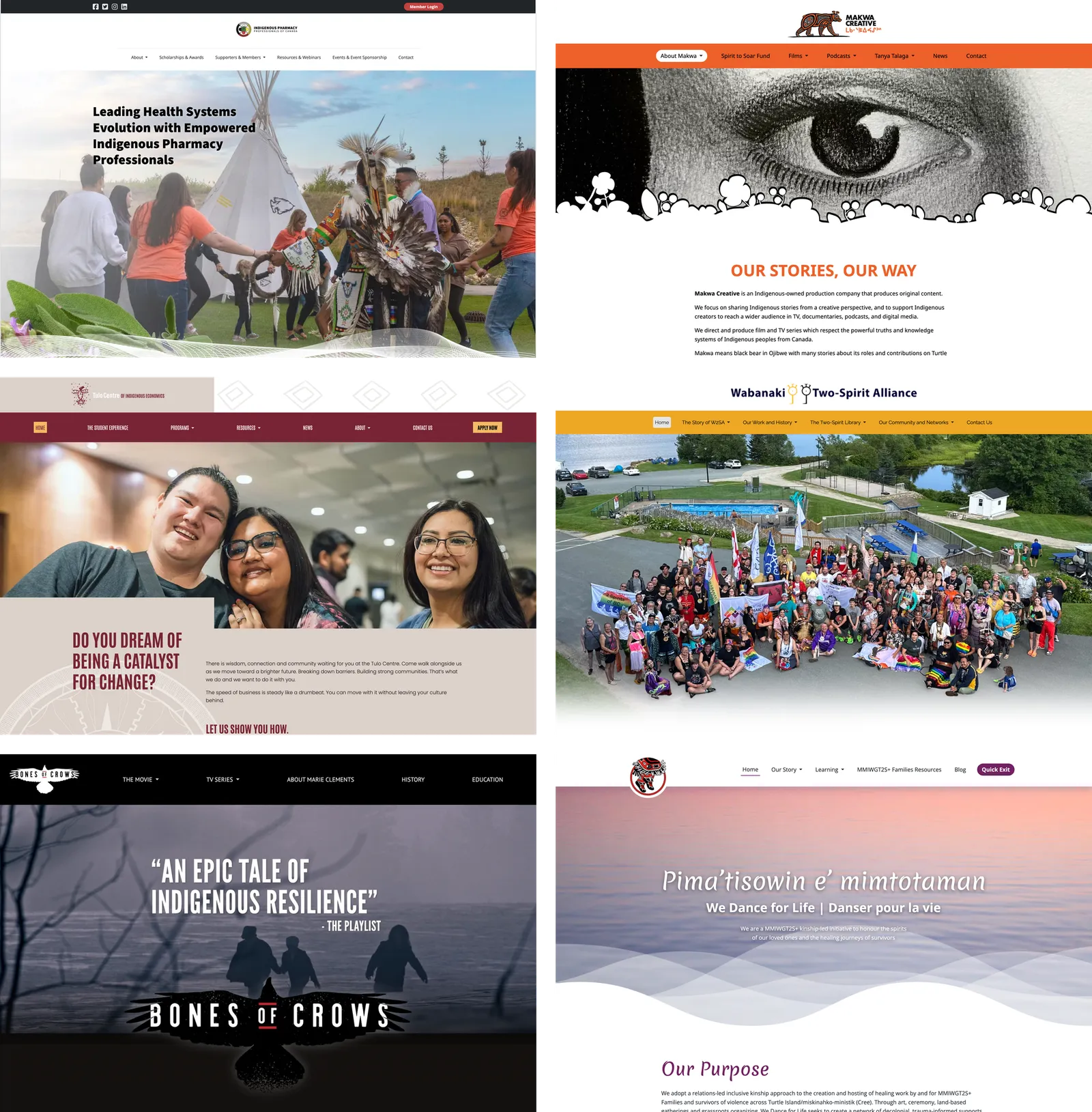
Left to right, top to bottom: Indigenous Pharmacy Professionals of Canada, Makwa Creative, Tulo Centre for Indigenous Economics, Wabanaki Two-Spirit Alliance, Bones of Crows, and We Dance for Life, which has since been rebuilt elsewhere.
A pharmacy association, a production company, an economics centre, a Two-Spirit alliance, a feature film, and a memorial project for MMIWG2S+ families. Every one of them runs on the same content management system.
There was a template. We barely used it. Every project arrived with custom design elements somewhere, so the template became a starting point rather than a shape to fit into, and most of the work was in editing it heavily enough that it stopped being recognizable.
That is the reason these don’t look alike. A CMS usually shows through, and you can normally tell which sites were built on the same one. Making that invisible was not a side effect of the system being good. It was the job.
One in detail: Indigenous Pharmacy
The Indigenous Pharmacy Professionals of Canada needed more than a website. They needed a membership, and not a simple one.
There are six kinds of member. Indigenous pharmacy professionals join free and hold the votes. Non-Indigenous allies pay to support the organization and get no vote. Then four organizational tiers: industry, professional bodies, pharmacy chains, individual pharmacies, at different prices with different benefits. The people the organization exists for pay nothing; the organizations that want to be associated with it pay for that privilege. The membership structure is the organization’s politics, expressed as a pricing table.
That is an awkward thing to ask of this CMS. It builds pages and serves them. It had no concept of an account, a payment, or a page that only some visitors are allowed to open, and nothing in the block system was going to grow one.
So we brought in tools that already knew how: Stripe to take the payments, Memberstack to hold the accounts and decide who sees what, both wired into the site through the CMS. The public pages stayed ordinary pages. The member pages looked like the rest of the site and behaved like something else entirely.
The part that didn’t fit the usual path was the order of things. IPPC wanted to approve an applicant before taking any money, which is backwards from how membership tools expect to work: paying is normally what makes you a member. Here you apply, you see a confirmation and what happens next, and payment only comes once you have been accepted. We automated that whole sequence rather than leaving someone to chase it by hand.
The same integration had to reach in the other direction too. Paying doesn’t only open private pages, it changes public ones: organizational members get their logo on the supporters page, where nobody logs in to see it. So membership state had to be readable from both sides of the login.
Safe Space
Some of these sites carry heavy content. Residential schools, missing and murdered women and girls, the things Indigenous organizations exist to document and refuse to let go unrecorded. A client asked whether anything could be done for someone reading it who needed to stop.
What we built is a button in the navigation that takes you to a safer space, and the important part is that it doesn’t take you off the site. You land somewhere calm, with supports: a phone number if you need help, room to breathe. When you’re ready you carry on from where you were.
That last detail is the whole decision. Sending someone away would have been easier to build and would have worked once, because almost nobody returns to a site they fled. Keeping them inside it means the break is a pause rather than an exit, and continuing costs nothing more than deciding to.

The label changes site to site. On We Dance for Life it reads Quick Exit, sitting at the end of the nav where it can always be found.
The idea wasn’t ours first. Another team at Animikii had built something like it before us. What we did was build our own for these sites when a client asked, and decide how it should behave: where the button lives, what is waiting on the other side of it, and that it keeps you on the site rather than sending you away.
Building on a CMS I also built
Most front-end work on a content management system is a negotiation with someone else’s software. When it can’t do what a design needs, you change the design, or you bolt something on beside it and hope nobody has to maintain it later.
I was in a less usual position on these projects, because I was also on the team building the CMS. When a design hit a wall, changing the tool was on the table.
And it hit a wall often. The CMS came with a set of standard blocks, and every single one of these sites needed at least one block that wasn’t among them. Most needed three or four. We designed those ourselves and added them to the CMS so it could serve the design it was being asked to build. That was the normal case rather than the exception: the tool got us most of the way, and the last stretch was written for each project.
They were built to be kept, not to get us through launch. A custom block went into the client’s CMS with its content already in it, and stayed there as something they could go on using and editing after we handed the site over. A one-off would have been quicker and would have left them with a page they couldn’t touch.
Occasionally a limitation was worth fixing in the CMS itself rather than working around it in one project, and then the fix carried into every site built afterwards. But that was the exception. Mostly we stayed inside what the tool could already do, because moving it is slower than working around it and every project has a date on it. The judgement was never whether something could be built. It was whether it was worth changing the tool to get there.
That is a less heroic answer than having the freedom and using it constantly, and it is the true one.